
 生成授权URL
# 一、准备工作
https://open.weixin.qq.com
# 1、注册
# 2、邮箱激活
# 3、完善开发者资料
# 4、开发者资质认证
准备营业执照,1-2个工作日审批、300元
# 5、创建网站应用
提交审核,7个工作日审批
# 6、内网穿透
ngrok的使用
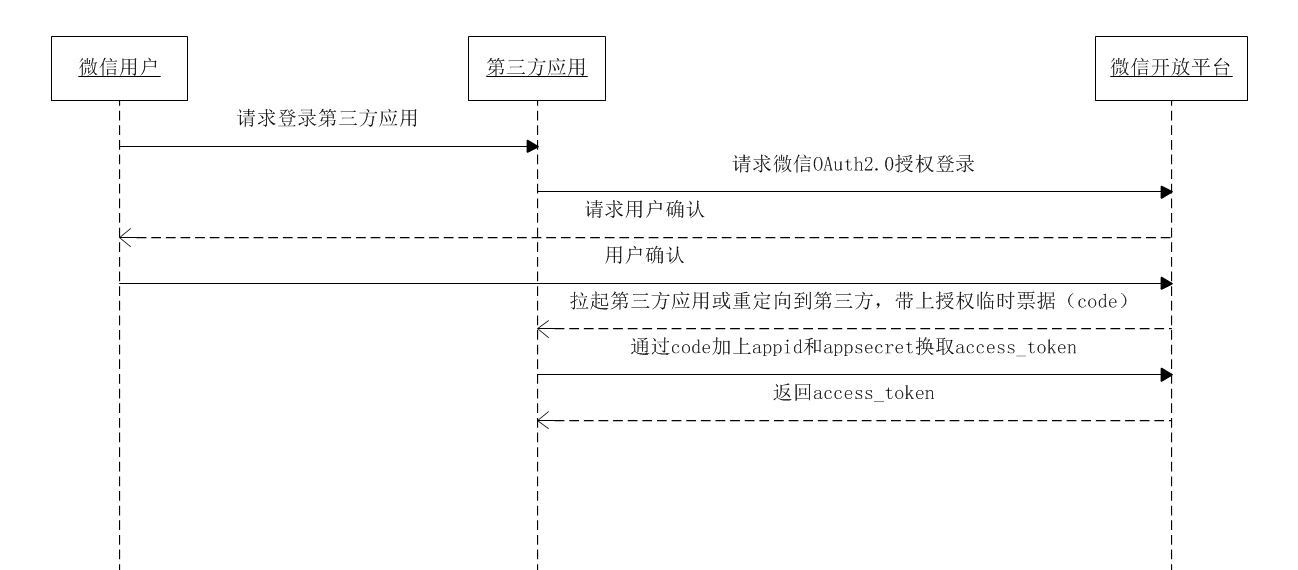
# 7、熟悉微信登录流程
参考文档:https://open.weixin.qq.com/cgi-bin/showdocument?action=dir_list&t=resource/res_list&verify=1&id=open1419316505&token=e547653f995d8f402704d5cb2945177dc8aa4e7e&lang=zh_CN
获取access_token时序图
# 二、后端开发
# 1、添加配置
application.properties添加相关配置信息
## 微信开放平台 appid
wx.open.app_id=你的appid
## 微信开放平台 appsecret
wx.open.app_secret=你的appsecret
## 微信开放平台 重定向url
wx.open.redirect_url=http://你的服务器名称/api/ucenter/wx/callback
1
2
3
4
5
6
2
3
4
5
6
# 2、创建常量类
创建util包,创建ConstantPropertiesUtil.java常量类
package com.guli.ucenter.util;

@Component
//@PropertySource("classpath:application.properties")
public class ConstantPropertiesUtil implements InitializingBean {

    @Value("${wx.open.app_id}")
    private String appId;

    @Value("${wx.open.app_secret}")
    private String appSecret;

    @Value("${wx.open.redirect_url}")
    private String redirectUrl;

    public static String WX_OPEN_APP_ID;
    public static String WX_OPEN_APP_SECRET;
    public static String WX_OPEN_REDIRECT_URL;

    @Override
    public void afterPropertiesSet() throws Exception {
        WX_OPEN_APP_ID = appId;
        WX_OPEN_APP_SECRET = appSecret;
        WX_OPEN_REDIRECT_URL = redirectUrl;
    }
}
1
2
3
4
5
6
7
8
9
10
11
12
13
14
15
16
17
18
19
20
21
22
23
24
25
26
2
3
4
5
6
7
8
9
10
11
12
13
14
15
16
17
18
19
20
21
22
23
24
25
26
# 3、创建controller
guli-microservice-ucenter微服务中创建api包
api包中创建WxApiController
package com.guli.ucenter.controller.api;

@CrossOrigin
@Controller//注意这里没有配置 @RestController
@RequestMapping("/api/ucenter/wx")
public class WxApiController {

    @GetMapping("login")
    public String genQrConnect(HttpSession session) {

        // 微信开放平台授权baseUrl
        String baseUrl = "https://open.weixin.qq.com/connect/qrconnect" +
                "?appid=%s" +
                "&redirect_uri=%s" +
                "&response_type=code" +
                "&scope=snsapi_login" +
                "&state=%s" +
                "#wechat_redirect";

        // 回调地址
        String redirectUrl = ConstantPropertiesUtil.WX_OPEN_REDIRECT_URL; //获取业务服务器重定向地址
        try {
            redirectUrl = URLEncoder.encode(redirectUrl, "UTF-8"); //url编码
        } catch (UnsupportedEncodingException e) {
            throw new GuliException(20001, e.getMessage());
        }

        // 防止csrf攻击(跨站请求伪造攻击)
        //String state = UUID.randomUUID().toString().replaceAll("-", "");//一般情况下会使用一个随机数
        String state = "imhelen";//为了让大家能够使用我搭建的外网的微信回调跳转服务器,这里填写你在ngrok的前置域名
        System.out.println("state = " + state);

        // 采用redis等进行缓存state 使用sessionId为key 30分钟后过期,可配置
        //键:"wechar-open-state-" + httpServletRequest.getSession().getId()
        //值:satte
        //过期时间:30分钟

        //生成qrcodeUrl
        String qrcodeUrl = String.format(
                baseUrl,
                ConstantPropertiesUtil.WX_OPEN_APP_ID,
                redirectUrl,
                state);

        return "redirect:" + qrcodeUrl;
    }
}
1
2
3
4
5
6
7
8
9
10
11
12
13
14
15
16
17
18
19
20
21
22
23
24
25
26
27
28
29
30
31
32
33
34
35
36
37
38
39
40
41
42
43
44
45
46
47
2
3
4
5
6
7
8
9
10
11
12
13
14
15
16
17
18
19
20
21
22
23
24
25
26
27
28
29
30
31
32
33
34
35
36
37
38
39
40
41
42
43
44
45
46
47
授权url参数说明
| 参数 | 是否必须 | 说明 |
|---|---|---|
| appid | 是 | 应用唯一标识 |
| redirect_uri | 是 | 请使用urlEncode对链接进行处理 |
| response_type | 是 | 填code |
| scope | 是 | 应用授权作用域,拥有多个作用域用逗号(,)分隔,网页应用目前仅填写snsapi_login即 |
| state | 否 | 用于保持请求和回调的状态,授权请求后原样带回给第三方。该参数可用于防止csrf攻击(跨站请求伪造攻击),建议第三方带上该参数,可设置为简单的随机数加session进行校验 |
# 4、测试
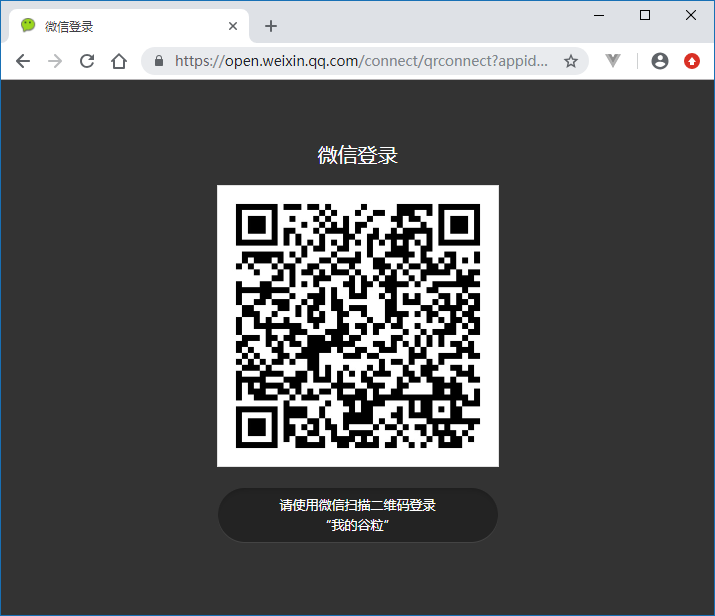
访问:http://localhost:8201/api/ucenter/wx/login (opens new window)
访问授权url后会得到一个微信登录二维码
用户扫描二维码会看到确认登录的页面
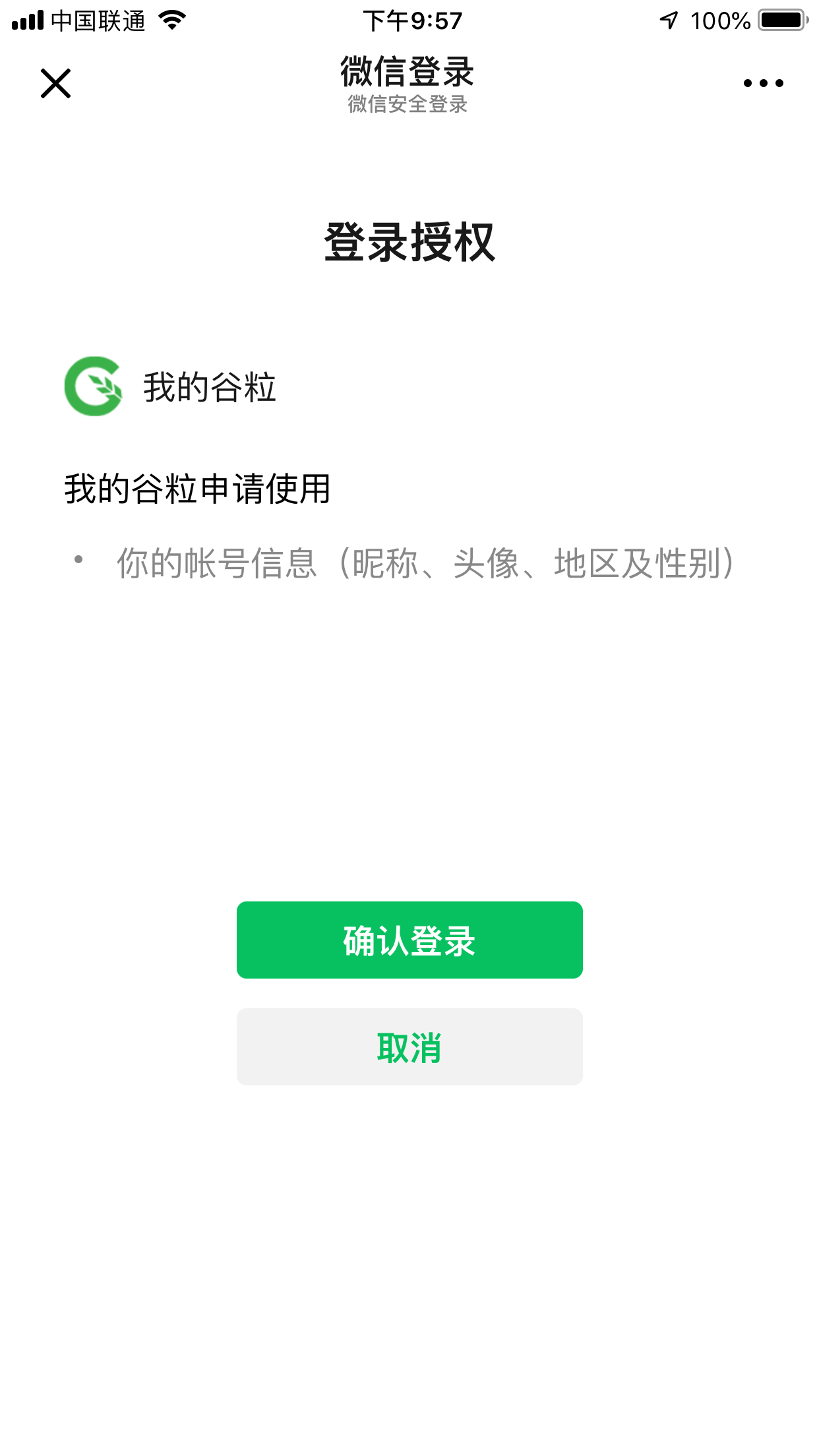 用户点击“确认登录”后,微信服务器会向谷粒学院的业务服务器发起回调,因此接下来我们需要开发回调controller
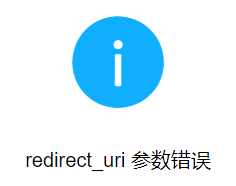
**注意:**如果没有正确的配置业务服务器的回调url,则会看到以下错误提示
编辑 (opens new window)
上次更新: 2024/06/15, 15:12:25