
 项目中的路由
# 一、后台系统路由实现分析
# 1、入口文件中调用路由
src/main.js
......
import router from './router' //引入路由模块
......
new Vue({
  el: '#app',
  router, //挂载路由
  store,
  render: h => h(App)
})
1
2
3
4
5
6
7
8
9
2
3
4
5
6
7
8
9
# 2、路由模块中定义路由
src/router/index.js
......
export const constantRouterMap = [
  ......
]

export default new Router({
  ......
  routes: constantRouterMap
})
1
2
3
4
5
6
7
8
9
2
3
4
5
6
7
8
9
# 二、谷粒学院路由定义
# 1、复制icon图标
将vue-element-admin/src/icons/svg 中的图标复制到 guli-admin项目中
# 2、修改路由
修改 src/router/index.js 文件,重新定义constantRouterMap
**注意:**每个路由的name不能相同
 export const constantRouterMap = [
  { path: '/login', component: () => import('@/views/login/index'), hidden: true },
  { path: '/404', component: () => import('@/views/404'), hidden: true },

  // 首页
  {
    path: '/',
    component: Layout,
    redirect: '/dashboard',
    name: 'Dashboard',
    children: [{
      path: 'dashboard',
      component: () => import('@/views/dashboard/index'),
      meta: { title: '谷粒学院后台首页', icon: 'dashboard' }
    }]
  },

  // 讲师管理
  {
    path: '/edu/teacher',
    component: Layout,
    redirect: '/edu/teacher/list',
    name: 'Teacher',
    meta: { title: '讲师管理', icon: 'peoples' },
    children: [
      {
        path: 'list',
        name: 'EduTeacherList',
        component: () => import('@/views/edu/teacher/list'),
        meta: { title: '讲师列表' }
      },
      {
        path: 'create',
        name: 'EduTeacherCreate',
        component: () => import('@/views/edu/teacher/form'),
        meta: { title: '添加讲师' }
      },
      {
        path: 'edit/:id',
        name: 'EduTeacherEdit',
        component: () => import('@/views/edu/teacher/form'),
        meta: { title: '编辑讲师', noCache: true },
        hidden: true
      }
    ]
  },

  { path: '*', redirect: '/404', hidden: true }
]
1
2
3
4
5
6
7
8
9
10
11
12
13
14
15
16
17
18
19
20
21
22
23
24
25
26
27
28
29
30
31
32
33
34
35
36
37
38
39
40
41
42
43
44
45
46
47
48
49
2
3
4
5
6
7
8
9
10
11
12
13
14
15
16
17
18
19
20
21
22
23
24
25
26
27
28
29
30
31
32
33
34
35
36
37
38
39
40
41
42
43
44
45
46
47
48
49
# 3、创建vue组件
在src/views文件夹下创建以下文件夹和文件
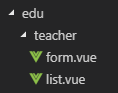
# 4、form.vue
<template>
  <div class="app-container">
    讲师表单
  </div>
</template>
1
2
3
4
5
2
3
4
5
# 5、list.vue
<template>
  <div class="app-container">
    讲师列表
  </div>
</template>
1
2
3
4
5
2
3
4
5
编辑 (opens new window)
上次更新: 2024/06/15, 15:12:25