
 后端集成OSS
# 一、新建云存储微服务
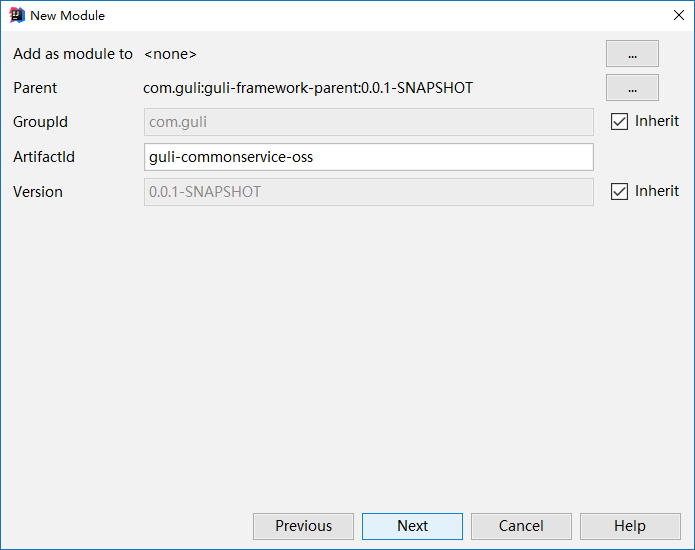
# 1、创建模块
Artifact:guli-commonservice-oss
# 2、配置pom.xml
<dependency>
     <groupId>com.guli</groupId>
     <artifactId>guli-framework-common</artifactId>
     <version>0.0.1-SNAPSHOT</version>
</dependency>

<!--aliyunOSS-->
<dependency>
    <groupId>com.aliyun.oss</groupId>
    <artifactId>aliyun-sdk-oss</artifactId>
    <version>2.8.3</version>
</dependency>

<!--日期时间工具-->
<dependency>
    <groupId>joda-time</groupId>
    <artifactId>joda-time</artifactId>
    <version>2.10.1</version>
</dependency>
2
3
4
5
6
7
8
9
10
11
12
13
14
15
16
17
18
19
# 3、配置application.properties
#服务端口
server.port=8001
#服务名
spring.application.name=guli-oss

#环境设置:dev、test、prod
spring.profiles.active=dev


#阿里云 OSS
#不同的服务器,地址不同
aliyun.oss.file.endpoint=your endpoint
aliyun.oss.file.keyid=your accessKeyId
aliyun.oss.file.keysecret=your accessKeySecret
#bucket可以在控制台创建,也可以使用java代码创建
aliyun.oss.file.bucketname=guli-file
aliyun.oss.file.filehost=avatar
2
3
4
5
6
7
8
9
10
11
12
13
14
15
16
17
# 4、logback-spring.xml
修改日志路径
# 5、创建启动类
创建OssApplication.java
package com.guli.oss;
@SpringBootApplication
@ComponentScan(basePackages={"com.guli.oss","com.guli.common"})
public class OssApplication {

    public static void main(String[] args) {
        SpringApplication.run(OssApplication.class, args);
    }
}
2
3
4
5
6
7
8
9
# 6、启动项目
报错
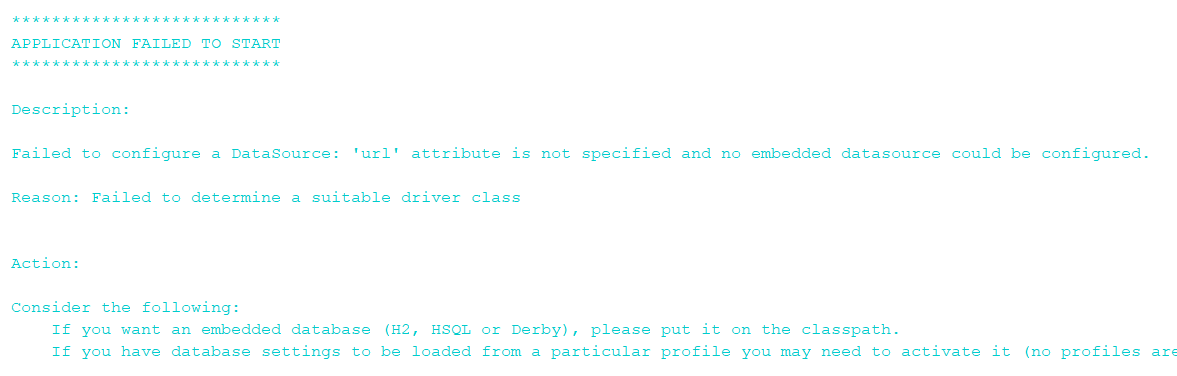
spring boot 会默认加载org.springframework.boot.autoconfigure.jdbc.DataSourceAutoConfiguration这个类,
而DataSourceAutoConfiguration类使用了@Configuration注解向spring注入了dataSource bean,又因为项目(oss模块)中并没有关于dataSource相关的配置信息,所以当spring创建dataSource bean时因缺少相关的信息就会报错。
解决办法:
方法1、在@SpringBootApplication注解上加上exclude,解除自动加载DataSourceAutoConfiguration
@SpringBootApplication(exclude = DataSourceAutoConfiguration.class)
方法2、common项目中mybatis-plus-boot-starter配置添加*
此种方式会引起后续的包扫描问题,后面再详解,此处先使用第一种方式
# 二、实现文件上传
# 1、从配置文件读取常量
创建常量读取工具类:ConstantPropertiesUtil.java
使用@Value读取application.properties里的配置内容
用spring的 InitializingBean 的 afterPropertiesSet 来初始化配置信息,这个方法将在所有的属性被初始化后调用。
package com.guli.oss.util;

/**
 * 常量类,读取配置文件application.properties中的配置
 */
@Component
//@PropertySource("classpath:application.properties")
public class ConstantPropertiesUtil implements InitializingBean {

    @Value("${aliyun.oss.file.endpoint}")
    private String endpoint;

    @Value("${aliyun.oss.file.keyid}")
    private String keyId;

    @Value("${aliyun.oss.file.keysecret}")
    private String keySecret;

    @Value("${aliyun.oss.file.filehost}")
    private String fileHost;

    @Value("${aliyun.oss.file.bucketname}")
    private String bucketName;

    public static String END_POINT;
    public static String ACCESS_KEY_ID;
    public static String ACCESS_KEY_SECRET;
    public static String BUCKET_NAME;
    public static String FILE_HOST ;

    @Override
    public void afterPropertiesSet() throws Exception {
        END_POINT = endpoint;
        ACCESS_KEY_ID = keyId;
        ACCESS_KEY_SECRET = keySecret;
        BUCKET_NAME = bucketName;
        FILE_HOST = fileHost;
    }
}
2
3
4
5
6
7
8
9
10
11
12
13
14
15
16
17
18
19
20
21
22
23
24
25
26
27
28
29
30
31
32
33
34
35
36
37
38
39
# 2、文件上传
创建Service接口:FileService.java
package com.guli.oss.service;
public interface FileService {

    /**
     * 文件上传至阿里云
     * @param file
     * @return
     */
    String upload(MultipartFile file);
}
2
3
4
5
6
7
8
9
10
实现:FileServiceImpl.java
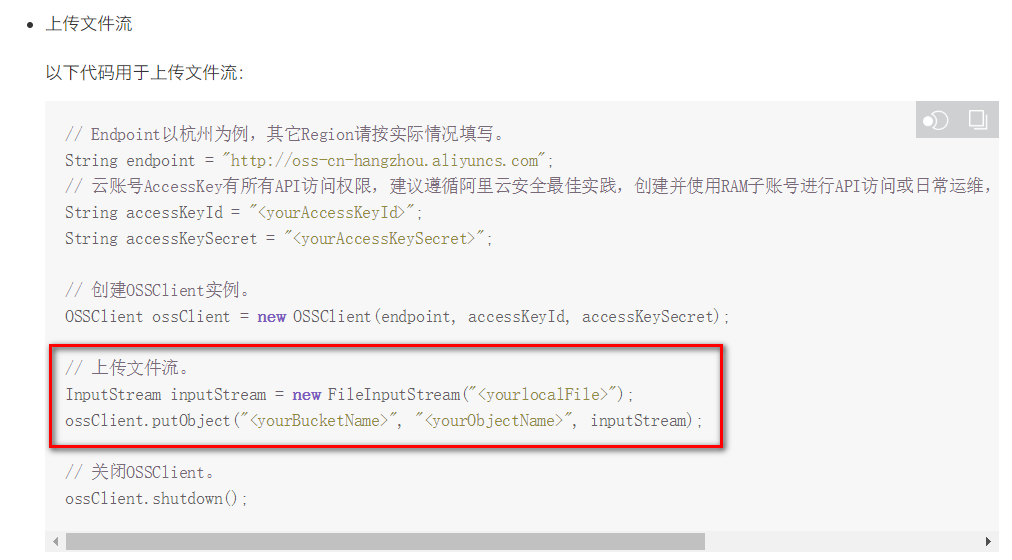
参考SDK中的:Java->上传文件->简单上传->流式上传->上传文件流
package com.guli.oss.service.impl;
public class FileServiceImpl implements FileService {

    @Override
    public String upload(MultipartFile file) {

        //获取阿里云存储相关常量
        String endPoint = ConstantPropertiesUtil.END_POINT;
        String accessKeyId = ConstantPropertiesUtil.ACCESS_KEY_ID;
        String accessKeySecret = ConstantPropertiesUtil.ACCESS_KEY_SECRET;
        String bucketName = ConstantPropertiesUtil.BUCKET_NAME;
        String fileHost = ConstantPropertiesUtil.FILE_HOST;

        String uploadUrl = null;

        try {
            //判断oss实例是否存在:如果不存在则创建,如果存在则获取
            OSSClient ossClient = new OSSClient(endPoint, accessKeyId, accessKeySecret);
            if (!ossClient.doesBucketExist(bucketName)) {
                //创建bucket
                ossClient.createBucket(bucketName);
                //设置oss实例的访问权限:公共读
                ossClient.setBucketAcl(bucketName, CannedAccessControlList.PublicRead);
            }

            //获取上传文件流
            InputStream inputStream = file.getInputStream();

            //构建日期路径:avatar/2019/02/26/文件名
            String filePath = new DateTime().toString("yyyy/MM/dd");

            //文件名:uuid.扩展名
            String original = file.getOriginalFilename();
            String fileName = UUID.randomUUID().toString();
            String fileType = original.substring(original.lastIndexOf("."));
            String newName = fileName + fileType;
            String fileUrl = fileHost + "/" + filePath + "/" + newName;

            //文件上传至阿里云
            ossClient.putObject(bucketName, fileUrl, inputStream);

            // 关闭OSSClient。
            ossClient.shutdown();

            //获取url地址
            uploadUrl = "http://" + bucketName + "." + endPoint + "/" + fileUrl;

        } catch (IOException e) {
            throw new GuliException(ResultCodeEnum.FILE_UPLOAD_ERROR);
        }

        return uploadUrl;
    }
}
2
3
4
5
6
7
8
9
10
11
12
13
14
15
16
17
18
19
20
21
22
23
24
25
26
27
28
29
30
31
32
33
34
35
36
37
38
39
40
41
42
43
44
45
46
47
48
49
50
51
52
53
54
添加枚举
FILE_UPLOAD_ERROR(false, 21004, "文件上传错误");
# 3、控制层
创建controller:FileUploadController.java
package com.guli.oss.controller;

@Api(description="阿里云文件管理")
@CrossOrigin //跨域
@RestController
@RequestMapping("/admin/oss/file")
public class FileController {

    @Autowired
    private FileService fileService;

    /**
     * 文件上传
     *
     * @param file
     */
    @ApiOperation(value = "文件上传")
    @PostMapping("upload")
    public R upload(
            @ApiParam(name = "file", value = "文件", required = true)
            @RequestParam("file") MultipartFile file) {

        String uploadUrl = fileService.upload(file);
        //返回r对象
        return R.ok().message("文件上传成功").data("url", uploadUrl);

    }
}
2
3
4
5
6
7
8
9
10
11
12
13
14
15
16
17
18
19
20
21
22
23
24
25
26
27
28
# 4、重启oss服务
# 5、配置Swagger
package com.guli.oss.config;

@Configuration
@EnableSwagger2
public class Swagger2Config {

    @Bean
    public Docket webApiConfig(){

        return new Docket(DocumentationType.SWAGGER_2)
                .apiInfo(webApiInfo())
                .select()
                .paths(Predicates.not(PathSelectors.regex("/error.*")))
                .build();

    }

    private ApiInfo webApiInfo(){

        return new ApiInfoBuilder()
                .title("文件上传通用服务")
                .description("本文档描述了文件上传通用服务接口定义")
                .version("1.0")
                .contact(new Contact("Helen", "http://atguigu.com", "[email protected]"))
                .build();
    }

}
2
3
4
5
6
7
8
9
10
11
12
13
14
15
16
17
18
19
20
21
22
23
24
25
26
27
28
# 6、Swagger中测试文件上传
# 7、配置nginx反向代理
将接口地址加入nginx配置
location ~ /oss/ {
    proxy_pass http://localhost:8001;
}
2
3
重启nginx
nginx -s reload