
 附件-内存分析工具
# 一、IDEA中安装JProfiler插件
IDEA:Settings–plugins–Browse repositories
# 二、安装JProfiler监控软件
# 1、下载地址
https://www.ej-technologies.com/download/jprofiler/version_92
# 2、安装
# 3、输入注册码
按默认选择“Single or evaluation license” ,Name 和 Company 随意填
JProfiler 9.2 注册码 [email protected]#23874-hrwpdp1sh1wrn#0620 [email protected]#36573-fdkscp15axjj6#25257 [email protected]#5481-ucjn4a16rvd98#6038 [email protected]#99016-hli5ay1ylizjj#27215 [email protected]#40775-3wle0g1uin5c1#0674
[email protected]#7009-14frku31ynzpfr#20176 [email protected]#49604-1jfe58we9gyb6#5814 [email protected]#25531-1qcev4yintqkj#23927 [email protected]#96496-1qsu1lb1jz7g8w#23479
# 三、配置IDEA运行环境
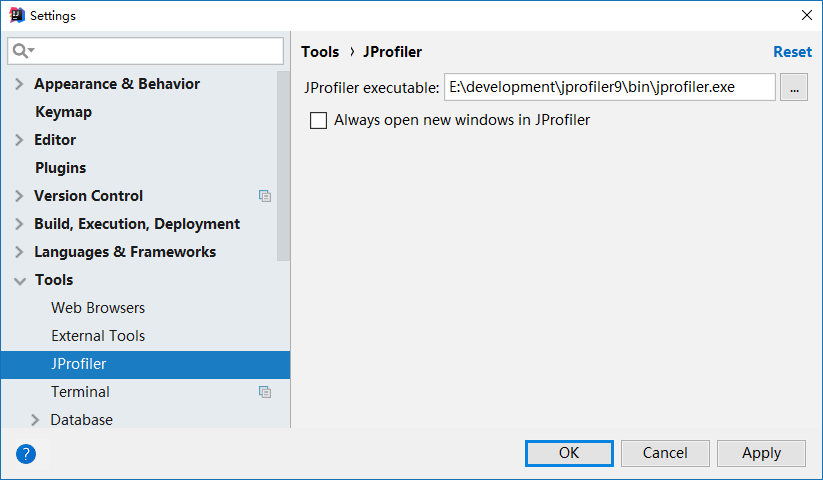
Settings–Tools–JProflier–JProflier executable选择JProfile安装可执行文件
# 四、运行程序
运行程序时选择图标

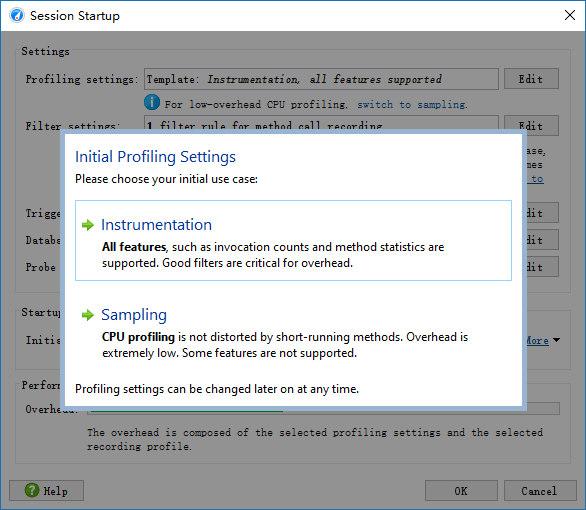
选择所有功能,如下
编辑 (opens new window)
上次更新: 2024/06/15, 15:12:25