
 作业-发布课程完善步骤导航-答案
# 独立完成后端代码逻辑的编写
要求完成接口:
(1)根据课程id获取课程发布基本信息
(2)根据课程id发布课程
# 作业实现:
# 一、根据id查询课程发布信息
方式一:业务层组装多个表多次的查询结果
方式二:数据访问层进行关联查询
我们使用第二种方式实现
# 1、数据访问层
接口:CourseMapper.java
package com.guli.edu.mapper;
public interface CourseMapper extends BaseMapper<Course> {
    CoursePublishVo selectCoursePublishVoById(String id);
}
1
2
3
4
2
3
4
实现:CourseMapper.xml
<select id="getCoursePublishVoById" resultType="com.guli.edu.vo.CoursePublishVo">
    SELECT
        c.title,
        c.cover,
        c.lesson_num AS lessonNum,
        CONVERT(c.price, DECIMAL(8,2)) AS price,
        s1.title AS subjectLevelOne,
        s2.title AS subjectLevelTwo,
        t.name AS teacherName
    FROM
        edu_course c
        LEFT JOIN edu_teacher t ON c.teacher_id = t.id
        LEFT JOIN edu_subject s1 ON c.subject_parent_id = s1.id
        LEFT JOIN edu_subject s2 ON c.subject_id = s2.id
    WHERE
        c.id = #{id}
</select>
1
2
3
4
5
6
7
8
9
10
11
12
13
14
15
16
17
2
3
4
5
6
7
8
9
10
11
12
13
14
15
16
17
# 2、业务层
接口:CourseService.java
CoursePublishVo getCoursePublishVoById(String id);
1
实现:CourseServiceImpl.java
@Override
public CoursePublishVo getCoursePublishVoById(String id) {
    return baseMapper.getCoursePublishVoById(id);
}
1
2
3
4
2
3
4
# 3、web层
@ApiOperation(value = "根据ID获取课程发布信息")
@GetMapping("course-publish-info/{id}")
public R getCoursePublishVoById(
    @ApiParam(name = "id", value = "课程ID", required = true)
    @PathVariable String id){

    CoursePublishVo courseInfoForm = courseService.getCoursePublishVoById(id);
    return R.ok().data("item", courseInfoForm);
}
1
2
3
4
5
6
7
8
9
2
3
4
5
6
7
8
9
测试:报告异常
AbstractHandlerExceptionResolver.java:194 |org.springframework.web.servlet.mvc.method.annotation.ExceptionHandlerExceptionResolver |Resolved exception caused by handler execution: org.apache.ibatis.binding.BindingException: Invalid bound statement (not found): com.guli.edu.mapper.CourseMapper.getCoursePublishVoById
问题分析:
dao层编译后只有class文件,没有mapper.xml,因为maven工程在默认情况下src/main/java目录下的所有资源文件是不发布到target目录下的,
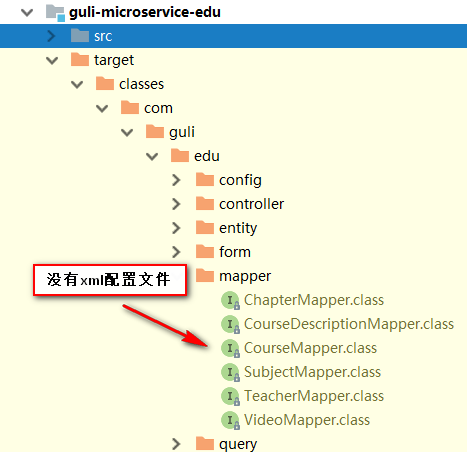
解决方案:
1、在guli_edu的pom中配置如下节点
<!-- 项目打包时会将java目录中的*.xml文件也进行打包 -->
<build>
    <resources>
        <resource>
            <directory>src/main/java</directory>
            <includes>
                <include>**/*.xml</include>
            </includes>
            <filtering>false</filtering>
        </resource>
    </resources>
</build>
1
2
3
4
5
6
7
8
9
10
11
12
2
3
4
5
6
7
8
9
10
11
12
重新打包项目会发现target目录下出现了xml文件夹
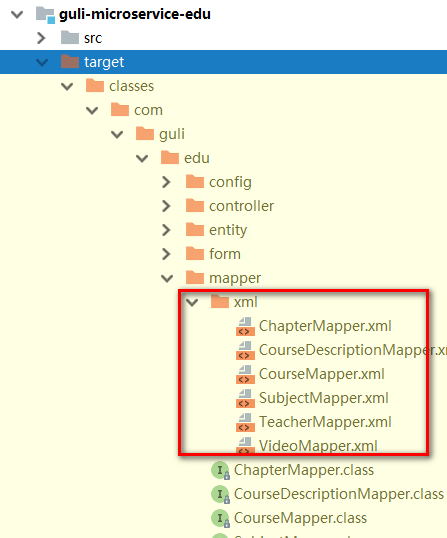
2、在Spring Boot配置文件中添加配置
#配置mapper xml文件的路径
mybatis-plus.mapper-locations=classpath:com/guli/edu/mapper/xml/*.xml
1
2
2
# 二、根据id发布课程
# 1、web层
@ApiOperation(value = "根据id发布课程")
@PutMapping("publish-course/{id}")
public R publishCourseById(
    @ApiParam(name = "id", value = "课程ID", required = true)
    @PathVariable String id){

    courseService.publishCourseById(id);
    return R.ok();
}
1
2
3
4
5
6
7
8
9
2
3
4
5
6
7
8
9
# 2、service层
接口
void publishCourseById(String id);
1
实现
@Override
public boolean publishCourseById(String id) {
    Course course = new Course();
    course.setId(id);
    course.setStatus(Course.COURSE_NORMAL);
    Integer count = baseMapper.updateById(course);
    return null != count && count > 0;
}
1
2
3
4
5
6
7
8
2
3
4
5
6
7
8
# 3、前端显示课程状态列
views/edu/course/list.vue
<el-table-column prop="status" label="课程状态" width="100" align="center" >
    <template slot-scope="scope">
        <el-tag :type="scope.row.status === 'Draft' ? 'primary' : 'success'">{{scope.row.status === 'Draft' ? '未发布' : '已发布'}}</el-tag>
    </template>
</el-table-column>
1
2
3
4
5
2
3
4
5
编辑 (opens new window)
上次更新: 2024/06/15, 15:12:25