
 课程封面
课程封面
# 一、整合上传组件
参考 http://element-cn.eleme.io/#/zh-CN/component/upload 用户头像上传
# 1、上传默认封面
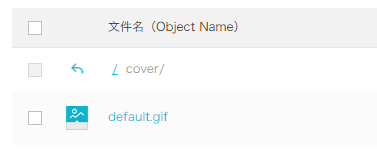
创建文件夹cover,上传默认的课程封面
# 
# 2、定义默认封面
const defaultForm = {
  ......,
  cover: process.env.OSS_PATH + '/cover/default.gif',
  ......
}
1
2
3
4
5
2
3
4
5
# 3、定义data数据
BASE_API: process.env.BASE_API // 接口API地址
1
# 4、组件模板
在info.vue中添加上传组件模板
<!-- 课程封面-->
<el-form-item label="课程封面">

  <el-upload
    :show-file-list="false"
    :on-success="handleAvatarSuccess"
    :before-upload="beforeAvatarUpload"
    :action="BASE_API+'/admin/oss/file/upload?host=cover'"
    class="avatar-uploader">
    <img :src="courseInfo.cover">
  </el-upload>

</el-form-item>
1
2
3
4
5
6
7
8
9
10
11
12
13
2
3
4
5
6
7
8
9
10
11
12
13
# 5、结果回调
handleAvatarSuccess(res, file) {
  console.log(res)// 上传响应
  console.log(URL.createObjectURL(file.raw))// base64编码
  this.courseInfo.cover = res.data.url
},

beforeAvatarUpload(file) {
  const isJPG = file.type === 'image/jpeg'
  const isLt2M = file.size / 1024 / 1024 < 2

  if (!isJPG) {
    this.$message.error('上传头像图片只能是 JPG 格式!')
  }
  if (!isLt2M) {
    this.$message.error('上传头像图片大小不能超过 2MB!')
  }
  return isJPG && isLt2M
}
1
2
3
4
5
6
7
8
9
10
11
12
13
14
15
16
17
18
2
3
4
5
6
7
8
9
10
11
12
13
14
15
16
17
18
# 二、修改后端api
# 1、修改上传controller
添加host可选参数
/**
     * 文件上传
     *
     * @param file
     */
@ApiOperation(value = "文件上传")
@PostMapping("upload")
public R upload(
    @ApiParam(name = "file", value = "文件", required = true)
    @RequestParam("file") MultipartFile file,

    @ApiParam(name = "host", value = "文件上传路径", required = false)
@RequestParam(value = "host", required = false) String host) {

    if(!StringUtils.isEmpty(host)){
        ConstantPropertiesUtil.FILE_HOST = host;
    }
    String uploadUrl = fileService.upload(file);
    //返回r对象
    return R.ok().message("文件上传成功").data("url", uploadUrl);

}
1
2
3
4
5
6
7
8
9
10
11
12
13
14
15
16
17
18
19
20
21
22
2
3
4
5
6
7
8
9
10
11
12
13
14
15
16
17
18
19
20
21
22
# 2、综合测试
编辑 (opens new window)
上次更新: 2024/06/15, 15:12:25