
 网关的基本配置
# 一、搭建Zuul服务器
# 1、创建网关模块
在 guliedu项目下初始化一个普通的maven模块
Artifact:guliedu_api_gateway
# 2、pom.xml依赖
<dependencies>
    <!--网关-->
    <dependency>
        <groupId>org.springframework.cloud</groupId>
        <artifactId>spring-cloud-starter-netflix-zuul</artifactId>
    </dependency>
</dependencies>
2
3
4
5
6
7
# 3、配置文件application.properties
server.port=9003

#服务的名称
spring.application.name=guliedu-api-gateway

#### 配置URL 映射 ###
#这里的配置表示,访问path路径 直接重定向到url指定的地址
#如:访问        /edu/course/18(http://localhost:9003/edu/course/18)
##    重定向到    http://localhost:8081/edu/course/18
zuul.routes.api-edu.path=/edu/**
zuul.routes.api-edu.url=http://localhost:8082/edu/
2
3
4
5
6
7
8
9
10
11
# 4、创建启动类
启动类添加@EnableZuulProxy,支持网关路由。
@EnableZuulProxy注解中包含了断路器注解@EnableCircuitBreaker
package com.atguigu.guliedu.gateway;
@SpringBootApplication
@EnableZuulProxy
public class ApiGatewayApplication {

    public static void main(String[] args) {
        SpringApplication.run(APIGatewayApplication.class, args);
    }
}
2
3
4
5
6
7
8
9
# 5、启动Zuul网关
# 6、通过网关访问微服务
例如:访问课程中心微服务
课程详情api:http://localhost:8082/edu/course/18
通过网关访问:http://localhost:9003/edu/course/18
通过url映射的方式来实现zull的转发有局限性,比如,每增加一个服务就需要配置一条内容,另外后端的服务如果是动态来提供(例如服务集群),就不能采用这种方案来配置了。
在实现微服务架构时,服务名与服务实例地址的关系在eureka server中已经存在了,所以只需要将Zuul注册到eureka server上去发现其他服务,就可以实现对serviceId的映射。
# 二、将网关服务化
# 1、添加依赖
添加对Eureka的支持
<!--服务注册-->
<dependency>
    <groupId>org.springframework.cloud</groupId>
    <artifactId>spring-cloud-starter-netflix-eureka-client</artifactId>
</dependency>
2
3
4
5
# 2、添加配置
连接到注册中心,将自身注册为服务
#指定注册中心地址
eureka.client.service-url.defaultZone=http://127.0.0.1:9002/eureka/
#eureka服务器上获取的是服务器的ip地址,否则是主机名
eureka.instance.prefer-ip-address=true
2
3
4
3、注释掉zuul.routes的相关配置
4、启动Zuul网关
依次启动Eureka、edu和网关
# 5、通过网关访问微服务
例如:访问用户中心微服务
教学中心根据id获取讲师信息api:http://localhost:8082/edu/teacher/1 (opens new window)
通过网关访问:http://localhost:9003/guliedu-edu/edu/teacher/1 (opens new window)
网关的默认路由规则:
Zuul会代理所有注册到Eureka Server的微服务,并且Zuul的路由规则如下:
http://ZUUL_HOST:ZUUL_PORT/微服务在Eureka上的serviceId/**
# 三、禁止通过网关访问某个服务
# 1、访问测试
依次启动Eureka、ucenter、statistics和网关
以下两个路径均可访问
内网访问:http://localhost:8084/admin/statistics/day/show-chart/2018-01-01/2019-01-01/login_num
网关访问:http://localhost:9003/guliedu-statistics/admin/statistics/day/show-chart/2018-01-01/2019-01-01/login_num
# 2、环境隔离配置
目的是不想让某个或某些服务对外暴露接口
例如:统计分析微服务只提供给内网业务系统访问,不提供外网的网站和应用用户访问
#### 环境隔离配置 ###
#禁止guliedu-statistics对外提供接口
zuul.ignored-services=guliedu-statistics
2
3
# 3、访问测试
内网可以访问:http://localhost:8084/admin/statistics/day/show-chart/2018-01-01/2019-01-01/login_num
网关不可以访问:http://localhost:9003/guliedu-statistics/admin/statistics/day/show-chart/2018-01-01/2019-01-01/login_num
# 四、禁止通过网关访问某些路由
# 1、访问测试
通过网关可以访问teacher模块的后台管理系统和网站的相关接口
后台接口:http://localhost:9003/guliedu-edu/admin/edu/teacher/1
网站接口:http://localhost:9003/guliedu-edu/edu/teacher/1
# 2、环境隔离配置
#### 禁止通过网关访问路由 ###
zuul.ignored-patterns=/**/admin/**
2
# 3、访问测试
网关不能访问所有包含 //admin/ 的路由
# 五、自定义路由映射
# 1、配置映射规则
可以通过我们定义的映射路径进行访问
#### 自定义路由映射####
zuul.routes.guliedu-edu=/edu-api/**
zuul.routes.guliedu-ucenter=/ucenter-api/**
zuul.routes.guliedu-oss=/oss-api/**
zuul.routes.guliedu-vod=/vod-api/**
2
3
4
5
# 2、访问测试
通过以下两种方式都可以访问
http://localhost:9003/guliedu-edu/edu/teacher/1
http://localhost:9003/edu-api/edu/teacher/1
# 六、网关默认不传递敏感信息
# 1、Ucenter中新建登录api
@PostMapping("login")
public R login(HttpServletRequest request){
    String token = request.getHeader("token");
    String cookie = request.getHeader("cookie");

    System.out.println(token);
    System.out.println(cookie);

    return R.ok();
}
2
3
4
5
6
7
8
9
10
# 2、postman中添加两个测试
测试1、不经过网关访问

测试2、经过网关访问

结论:
经过网关访问的请求,传输过程中cookie被过滤掉了
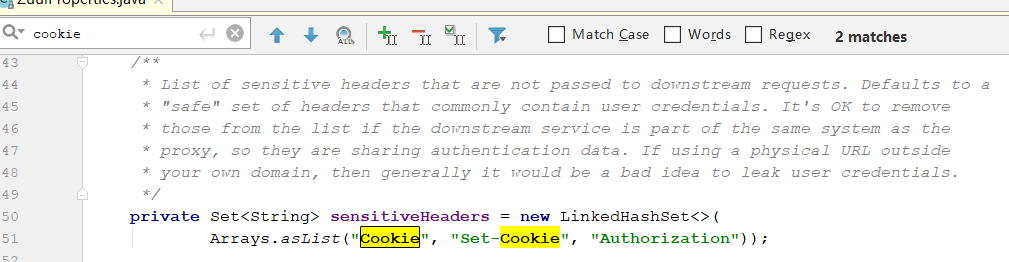
解决方案:
1、使用token
2、在配置文件中将请求头的过滤清除掉,使cookie可以向下游传递
#还原被网关过滤的请求头
zuul.sensitive-headers=
2