
 谷粒商城—分布式基础第五部分
# 19. 分组校验功能(完成多场景的复杂校验)
# 1、给校验注解,标注上groups,指定什么情况下才需要进行校验
如:指定在更新和添加的时候,都需要进行校验
	@NotEmpty
	@NotBlank(message = "品牌名必须非空",groups = {UpdateGroup.class,AddGroup.class})
	private String name;
2
3
在这种情况下,没有指定分组的校验注解,默认是不起作用的。想要起作用就必须要加groups。
# 2、业务方法参数上使用@Validated注解
@Validated的value方法:
Specify one or more validation groups to apply to the validation step kicked off by this annotation. 指定一个或多个验证组以应用于此注释启动的验证步骤。
JSR-303 defines validation groups as custom annotations which an application declares for the sole purpose of using them as type-safe group arguments, as implemented in SpringValidatorAdapter.
JSR-303 将验证组定义为自定义注释,应用程序声明的唯一目的是将它们用作类型安全组参数,如 SpringValidatorAdapter 中实现的那样。
Other SmartValidator implementations may support class arguments in other ways as well.
其他SmartValidator 实现也可以以其他方式支持类参数。
# 3、默认情况下,在分组校验情况下,没有指定指定分组的校验注解,将不会生效,它只会在不分组的情况下生效。
# 20. 自定义校验功能
# 1、编写一个自定义的校验注解
@Documented
@Constraint(validatedBy = { ListValueConstraintValidator.class})
@Target({ METHOD, FIELD, ANNOTATION_TYPE, CONSTRUCTOR, PARAMETER, TYPE_USE })
@Retention(RUNTIME)
public @interface ListValue {
    String message() default "{com.bigdata.common.valid.ListValue.message}";

    Class<?>[] groups() default { };

    Class<? extends Payload>[] payload() default { };

    int[] value() default {};
}
2
3
4
5
6
7
8
9
10
11
12
13
14
# 2、编写一个自定义的校验器
public class ListValueConstraintValidator implements ConstraintValidator<ListValue,Integer> {
    private Set<Integer> set=new HashSet<>();
    @Override
    public void initialize(ListValue constraintAnnotation) {
        int[] value = constraintAnnotation.value();
        for (int i : value) {
            set.add(i);
        }

    }

    @Override
    public boolean isValid(Integer value, ConstraintValidatorContext context) {


        return  set.contains(value);
    }
}
2
3
4
5
6
7
8
9
10
11
12
13
14
15
16
17
18
19
20
# 3、关联自定义的校验器和自定义的校验注解
@Constraint(validatedBy = { ListValueConstraintValidator.class})
# 4、使用实例
	/**
	 * 显示状态[0-不显示;1-显示]
	 */
	@ListValue(value = {0,1},groups ={AddGroup.class})
	private Integer showStatus;
2
3
4
5
# 21. 商品SPU和SKU管理
重新执行“sys_menus.sql”
# 22. 点击子组件,父组件触发事件
现在想要实现点击菜单的左边,能够实现在右边展示数据
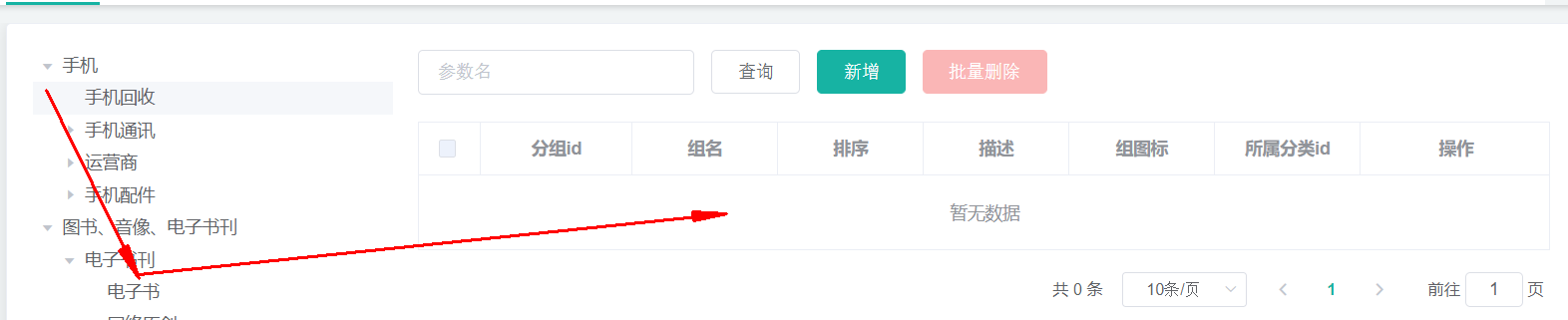
父子组件传递数据:
1)子组件给父组件传递数据,事件机制;
在category中绑定node-click事件,
<el-tree :data="menus" :props="defaultProps" node-key="catId" ref="menuTree" @node-click="nodeClick" ></el-tree>
2)子组件给父组件发送一个事件,携带上数据;
    nodeClick(data,Node,component){
       console.log("子组件",data,Node,component);
       this.$emit("tree-node-click",data,Node,component);
    },
2
3
4
this.$emit(事件名,"携带的数据");
3)父组件中的获取发送的事件
<category @tree-node-click="treeNodeClick"></category>
    //获取发送的事件数据
    treeNodeClick(data,Node,component){
     console.log("attgroup感知到的category的节点被点击",data,Node,component);
     console.log("刚才被点击的菜单ID",data.catId);
    },
2
3
4
5
# 23. 规格参数新增与VO
规格参数新增时,请求的URL:Request URL:
http://localhost:88/api/product/attr/base/list/0?t=1588731762158&page=1&limit=10&key=
当有新增字段时,我们往往会在entity实体类中新建一个字段,并标注数据库中不存在该字段,然而这种方式并不规范
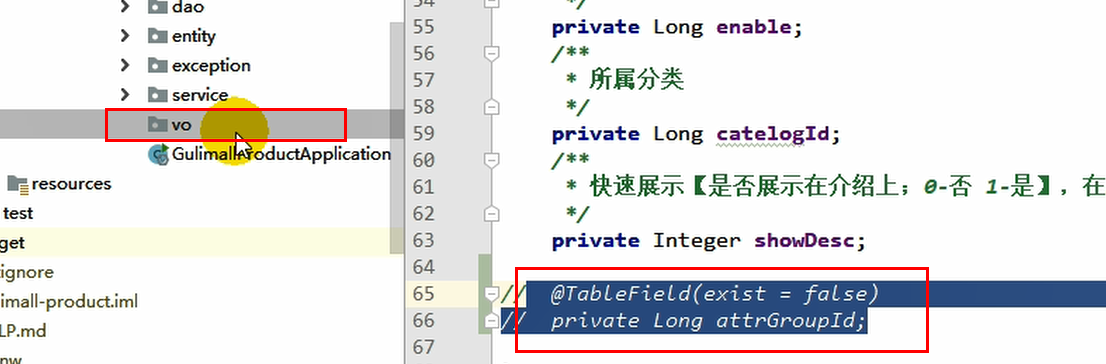
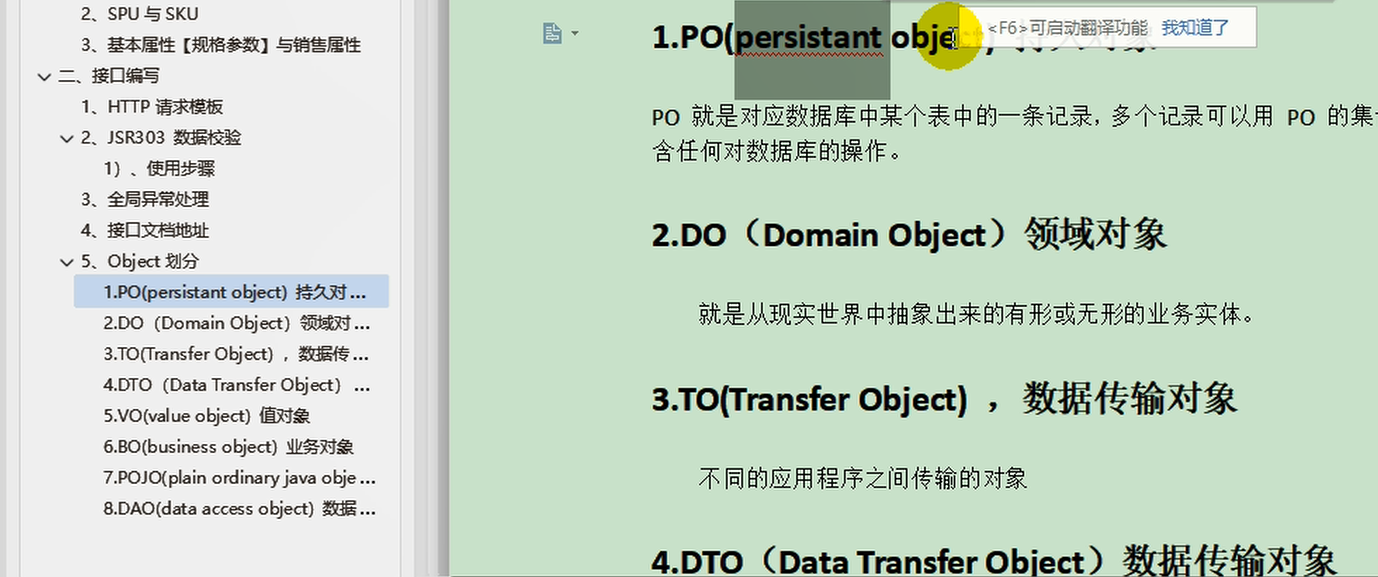
比较规范的做法是,新建一个vo文件夹,将每种不同的对象,按照它的功能进行了划分。在java中,涉及到了这几种类型
Request URL: http://localhost:88/api/product/attr/save,现在的情况是,它在保存的时候,只是保存了attr,并没有保存attrgroup,为了解决这个问题,我们新建了一个vo/AttrVo,在原AttrEntity基础上增加了attrGroupId字段,使得保存新增数据的时候,也保存了它们之间的关系。
通过" BeanUtils.copyProperties(attr,attrEntity);"能够实现在两个Bean之间拷贝数据,但是两个Bean的字段要相同
   @Override
    public void saveAttr(AttrVo attr) {
        AttrEntity attrEntity = new AttrEntity();
        BeanUtils.copyProperties(attr,attrEntity);
        this.save(attrEntity);
    }
2
3
4
5
6
问题:现在有两个查询,一个是查询部分,另外一个是查询全部,但是又必须这样来做吗?还是有必要的,但是可以在后台进行设计,两种查询是根据catId是否为零进行区分的。
# 24. 查询分组关联属性和删除关联
获取属性分组的关联的所有属性
API:https://easydoc.xyz/doc/75716633/ZUqEdvA4/LnjzZHPj (opens new window)
发送请求:/product/attrgroup/{attrgroupId}/attr/relation
获取当前属性分组所关联的属性
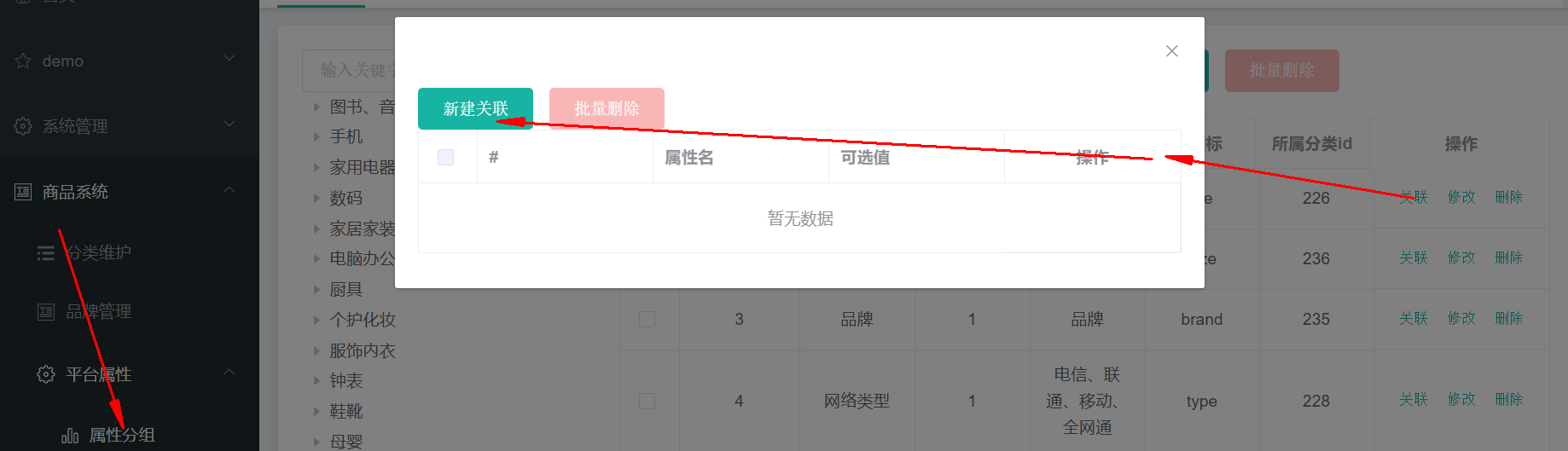
如何查找:既然给出了attr_group_id,那么到中间表中查询出来所关联的attr_id,然后得到最终的所有属性即可。
可能出现null值的问题
# 25. 查询分组未关联的属性
/product/attrgroup/{attrgroupId}/noattr/relation
API:https://easydoc.xyz/doc/75716633/ZUqEdvA4/d3EezLdO (opens new window)
获取属性分组里面还没有关联的本分类里面的其他基本属性,方便添加新的关联
Request URL: http://localhost:88/api/product/attrgroup/1/noattr/relation?t=1588780783441&page=1&limit=10&key=
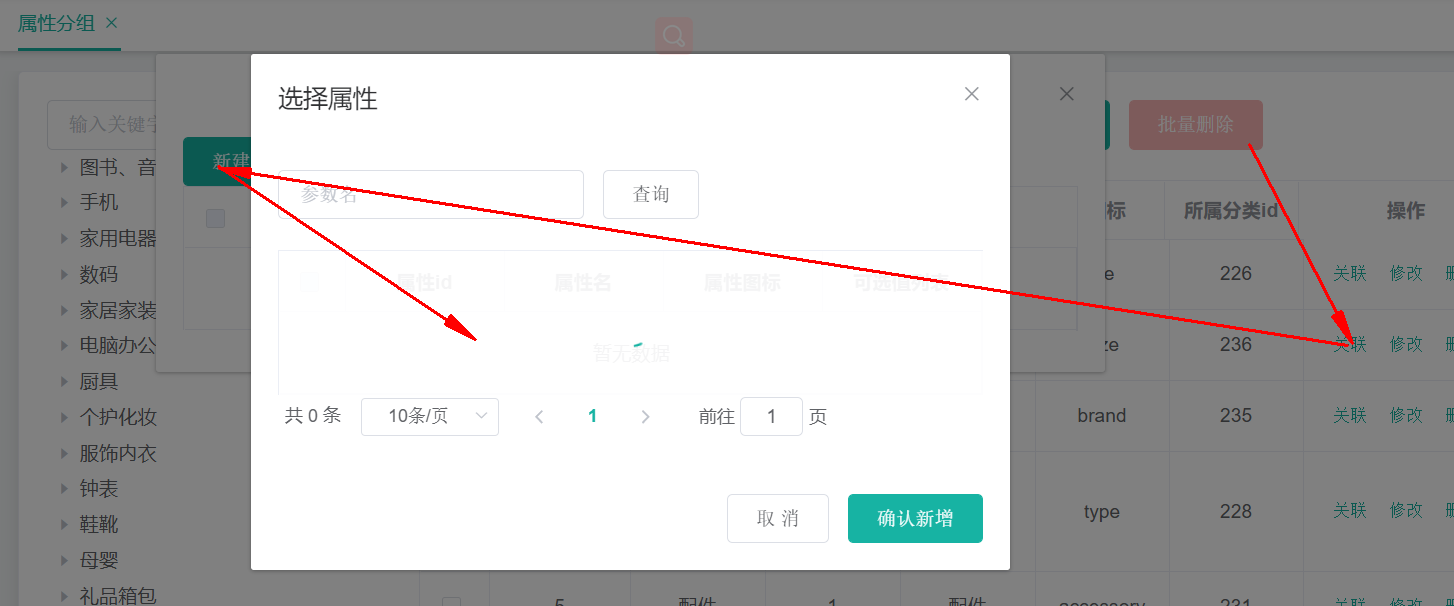
属性分组,对应于“pms_attr_group”表,每个分组下,需要查看到关联了哪些属性信息,销售属性不需要和分组进行关联,但是规格参数要和属性分组进行关联。
规格参数:对应于pms_attr表,attr_type=1,需要显示分组信息
销售属性:对应于pms_attr`表,attr_type=0,不需要显示分组信息
分组ID为9的分组:Request URL: http://localhost:88/api/product/attrgroup/9/noattr/relation?t=1588822258669&page=1&limit=10&key=
对应的数据库字段
attr_group_id attr_group_name sort descript icon catelog_id
        9  主体                    1  型号 平台                   wu               454
       10  显卡                    1  显存容量                    wu               454
       11  输入设备                  1  鼠标 键盘                   wu               454
       12  主板                    1  显卡类型 芯片组                wu               454
       13  规格                    1  尺寸                      wu               454
查询attrgroupId=9的属性分组:
AttrGroupEntity attrGroupEntity = attrGroupDao.selectById(attrgroupId);
获取到分类信息:
Long catelogId = attrGroupEntity.getCatelogId();
目标:获取属性分组没有关联的其他属性
也就是获取attrgroupId=9的属性分组中,关联的分类catelog_id =454 (台式机),其他基本属性
在该属性分组中,现在已经关联的属性:
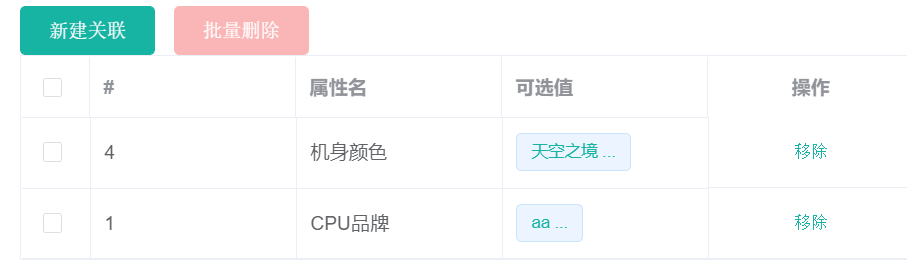
本分类下,存在哪些基本属性?
没有关联的其他属性
已经关联的属性,这些属性是如何关联上的?
答:在创建规格参数的时候,已经设置了需要关联哪些属性分组。
想要知道还没有关联哪些,先查看关联了哪些,如何排除掉这些就是未关联的
在中间表中显示了属性和属性分组之间的关联关系,在属性表中显示了所有的属性,
先查询中间表,得到所有已经关联的属性的id,然后再次查询属性表,排除掉已经建立关联的属性ID,将剩下的属性ID和属性建立起关联关系
# 26. 添加属性和分组的关联关系
请求类型:Request URL: http://localhost:88/api/product/attrgroup/attr/relation
请求方式:POST
请求数据:[{"attrId":10,"attrGroupId":9}]
API:https://easydoc.xyz/doc/75716633/ZUqEdvA4/VhgnaedC (opens new window)
响应数据:
{
	"msg": "success",
	"code": 0
}
2
3
4
本质就是在中间表pms_attr_attrgroup_relation中,添加一条记录的过程
# 27. 发布商品
获取所有会员等级:/member/memberlevel/list
API:https://easydoc.xyz/doc/75716633/ZUqEdvA4/jCFganpf (opens new window)
在“gulimall-gateway”中修改“”文件,添加对于member的路由
        - id: gulimall-member
          uri: lb://gulimall-member
          predicates:
            - Path=/api/member/**
          filters:
            - RewritePath=/api/(?<segment>/?.*),/$\{segment}
2
3
4
5
6
在“gulimall-member”中,创建“bootstrap.properties”文件,内容如下:
spring.cloud.nacos.config.name=gulimall-member
spring.cloud.nacos.config.server-addr=192.168.137.14:8848
spring.cloud.nacos.config.namespace=795521fa-77ef-411e-a8d8-0889fdfe6964
spring.cloud.nacos.config.extension-configs[0].data-id=gulimall-member.yml
spring.cloud.nacos.config.extension-configs[0].group=DEFAULT_GROUP
spring.cloud.nacos.config.extension-configs[0].refresh=true
2
3
4
5
6
获取分类关联的品牌:/product/categorybrandrelation/brands/list
API:https://easydoc.xyz/doc/75716633/ZUqEdvA4/HgVjlzWV (opens new window)
遇到PubSub问题
- 首先安装pubsub-js
`npm install --save pubsub-js`
- 订阅方组件
`import PubSub from 'pubsub-js'`
该this.PubSub为PubSub。
获取分类下所有分组&关联属性
请求类型:/product/attrgroup/{catelogId}/withattr
请求方式:GET
请求URL:http://localhost:88/api/product/attrgroup/225/withattr?t=1588864569478
mysql默认的隔离级别为读已提交,为了能够在调试过程中,获取到数据库中的数据信息,可以调整隔离级别为读未提交:
SET SESSION TRANSACTION ISOLATION LEVEL READ UNCOMMITTED;
但是它对于当前的事务窗口生效,如果想要设置全局的,需要加上global字段。
# 28. 商品管理
当新建时:
t: 1588983621569
status: 0
key:
brandId: 0
catelogId: 0
page: 1
limit: 10
2
3
4
5
6
7
当上架时:
t: 1588983754030
status: 1
key:
brandId: 0
catelogId: 0
page: 1
limit: 10
2
3
4
5
6
7
当下架时:
t: 1588983789089
status: 2
key:
brandId: 0
catelogId: 0
page: 1
limit: 10
2
3
4
5
6
7
在SPU中,写出的日期数据都不符合规则:

想要符合规则,可以设置写出数据的规则:
spring.jackson
  jackson:
    date-format: yyyy-MM-dd HH:mm:ss
2
SKU检索:
Request URL: http://localhost:88/api/product/skuinfo/list?t=1588989437944&page=1&limit=10&key=&catelogId=0&brandId=0&min=0&max=0
请求体:
t: 1588989437944
page: 1
limit: 10
key:
catelogId: 0
brandId: 0
min: 0
max: 0
2
3
4
5
6
7
8
API: https://easydoc.xyz/doc/75716633/ZUqEdvA4/ucirLq1D
# 29. 仓库管理
库存信息表:wms_ware_info
【1】仓库列表功能:
【2】查询商品库存:
【3】查询采购需求:
【4】 合并采购需求:
合并整单选中parcharseID:Request URL: http://localhost:88/api/ware/purchase/merge
请求数据:
{purchaseId: 1, items: [1, 2]}
items: [1, 2]
2
合并整单未选择parcharseID :Request URL: http://localhost:88/api/ware/purchase/merge
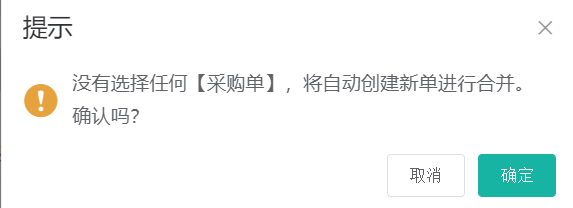
items: [1, 2]
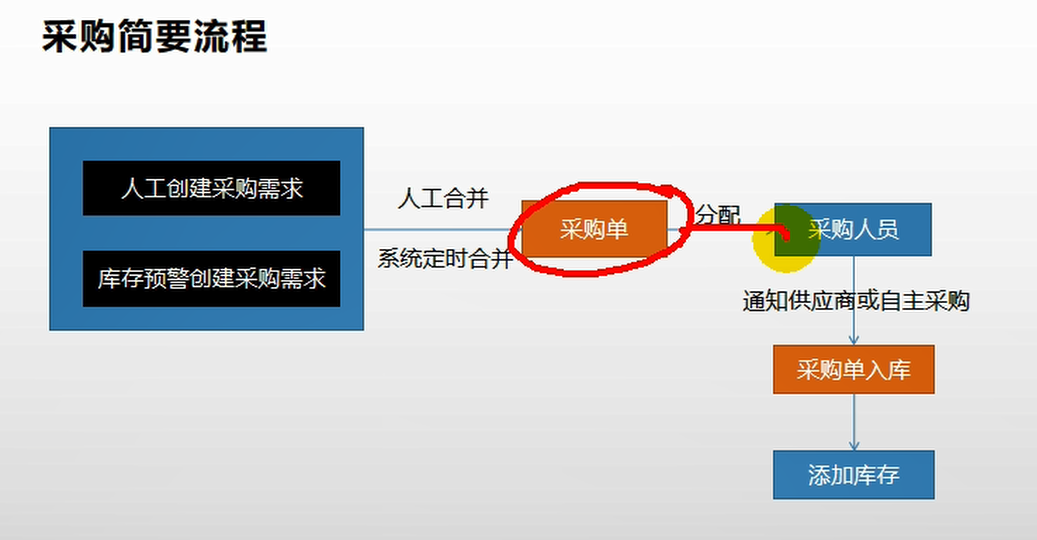
涉及到两张表:wms_purchase_detail,wms_purchase
现在采购单中填写数据,然后关联用户,关联用户后,
总的含义,就是根据采购单中的信息,更新采购需求,在采购单中填写采购人员,采购单号,采购的时候,更新采购细节表中的采购人员ID和采购状态。
领取采购单
http://localhost:88/api/ware/purchase/received
(1)某个人领取了采购单后,先看采购单是否处于未分配状态,只有采购单是新建或以领取状态时,才更新采购单的状态
(2)
【1】仓库列表功能: https://easydoc.xyz/doc/75716633/ZUqEdvA4/mZgdqOWe
【2】查询商品库存: https://easydoc.xyz/doc/75716633/ZUqEdvA4/hwXrEXBZ
【3】查询采购需求: https://easydoc.xyz/doc/75716633/ZUqEdvA4/Ss4zsV7R
【4】 合并采购需求:https://easydoc.xyz/doc/75716633/ZUqEdvA4/cUlv9QvK
【5】查询未领取的采购单: https://easydoc.xyz/doc/75716633/ZUqEdvA4/hI12DNrH
【6】领取采购单: https://easydoc.xyz/doc/75716633/ZUqEdvA4/vXMBBgw1
完成采购,在完成采购过程中,需要涉及到设置SKU的name信息到仓库中,这是通过远程调用“gulimall-product”来实现根据sku_id查询得到sku_name的,如果这个过程发生了异常,事务不想要回滚,目前采用的方式是通过捕获异常的方式,防止事务回滚,是否还有其他的方式呢?这个问题留待以后解决。
 @Override
    public void addStock(Long skuId, Long wareId, Integer skuNum) {

        List<WareSkuEntity> wareSkuEntities = wareSkuDao.selectList(new QueryWrapper<WareSkuEntity>().eq("sku_id", skuId).eq("ware_id", wareId));

        if(wareSkuEntities == null || wareSkuEntities.size() ==0 ){
             //新增
            WareSkuEntity wareSkuEntity = new WareSkuEntity();
            wareSkuEntity.setSkuId(skuId);
            wareSkuEntity.setWareId(wareId);
            wareSkuEntity.setStock(skuNum);
            wareSkuEntity.setStockLocked(0);

            //远程查询SKU的name,若失败无需回滚
            try {
                R info = productFeignService.info(skuId);
                if(info.getCode() == 0){
                    Map<String,Object> data=(Map<String,Object>)info.get("skuInfo");
                    wareSkuEntity.setSkuName((String) data.get("skuName"));
                }
            } catch (Exception e) {

            }

            wareSkuDao.insert(wareSkuEntity);
        }else{
            //插入
            wareSkuDao.addStock(skuId,wareId,skuNum);
        }

    }
2
3
4
5
6
7
8
9
10
11
12
13
14
15
16
17
18
19
20
21
22
23
24
25
26
27
28
29
30
31
# 30. 获取spu规格
在SPU管理页面,获取商品规格的时候,出现400异常,浏览器显示跳转不了
问题现象:

出现问题的代码:
    attrUpdateShow(row) {
      console.log(row);
      this.$router.push({
        path: "/product-attrupdate",
        query: { spuId: row.id, catalogId: row.catalogId }
      });
    },
2
3
4
5
6
7
暂时不知道如何解决问题。只能留待以后解决。
经过测试发现,问题和上面的代码没有关系,问题出现在“attrupdate.vue”上,该vue页面无法通过浏览器访问,当输入访问URL( http://localhost:8001/#/product-attrupdate )的时候,就会出现404,而其他的请求则不会出现这种情况,不知为何。
通过POSTMAN进行请求的时候,能够请求到数据。
经过分析发现,是因为在数据库中没有该页面的导航所导致的,为了修正这个问题,可以在“sys-menu”表中添加一行,内容位:

这样当再次访问的时候,在“平台属性”下,会出现“规格维护”菜单,
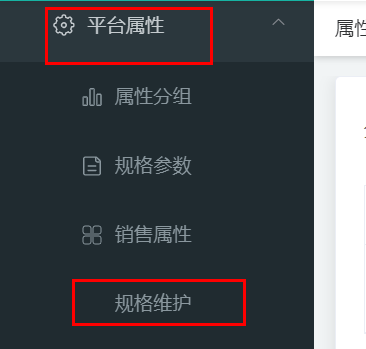
当再次点击“规格”的时候,显示出菜单
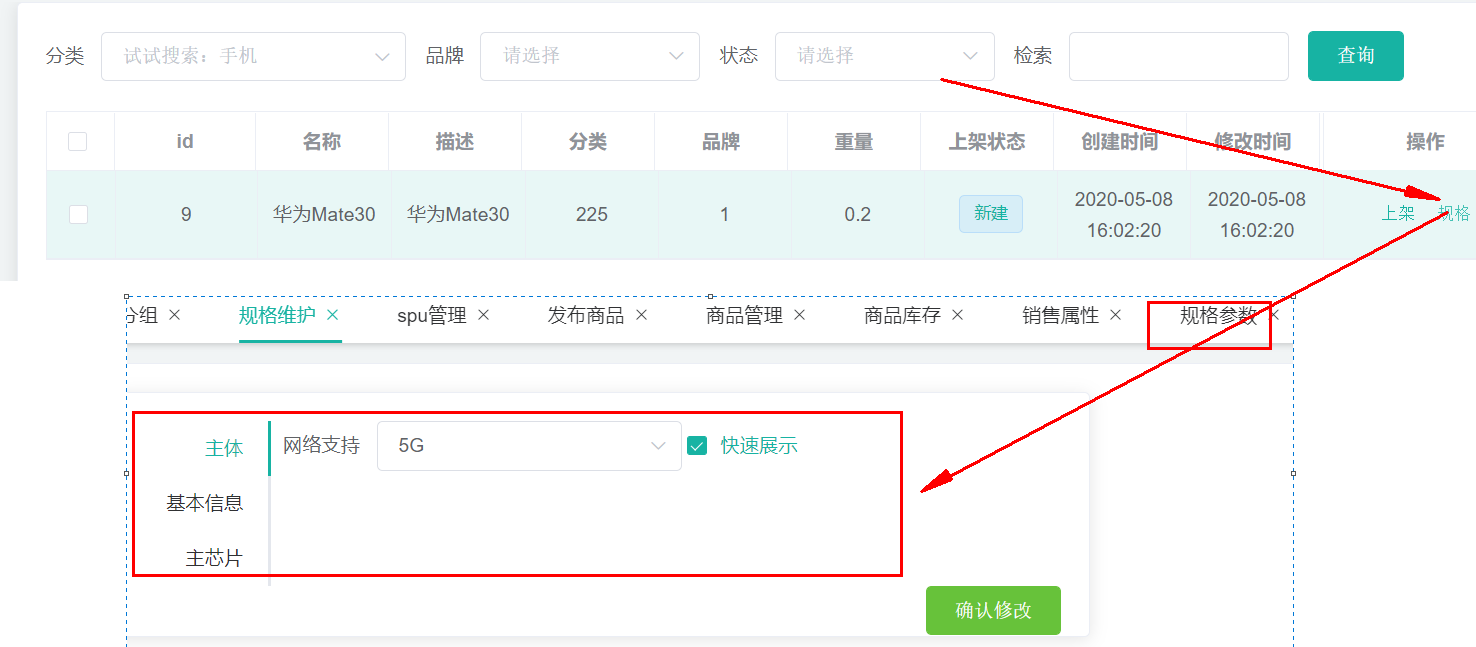
不过这种菜单并不符合我们的需要,我们需要让它以弹出框的形式出现。
# 31. 修改商品规格
API: https://easydoc.xyz/doc/75716633/ZUqEdvA4/GhnJ0L85
URL:/product/attr/update/{spuId}
# 小结:
# 1. 在open fen中会将调用的数据转换为JSON,接收方接收后,将JSON转换为对象,此时调用方和被调用方的处理JSON的对象不一定都是同一个类,只要它们的字段类型吻合即可。
调用方:
@FeignClient(value = "gulimall-coupon")
public interface CouponFenService {

    @PostMapping("/coupon/spubounds/save")
    R saveSpuBounds(@RequestBody SpuBoundTo spuBoundTo);

    @PostMapping("/coupon/skufullreduction/saveInfo")
    R saveSkuReduction(@RequestBody SkuReductionTo skuReductionTo);
}
2
3
4
5
6
7
8
9
被调用方:
    @PostMapping("/save")
    public R save(@RequestBody SpuBoundsEntity spuBounds){
		spuBoundsService.save(spuBounds);

        return R.ok();
    }

    @PostMapping("/saveInfo")
    public R saveInfo(@RequestBody SkuReductionTo skuReductionTo){
        skuFullReductionService.saveSkuReduction(skuReductionTo);
        return R.ok();
    }
2
3
4
5
6
7
8
9
10
11
12
调用方JSON化时的对象SpuBoundTo:
@Data
public class SpuBoundTo {
    private Long spuId;
    private BigDecimal buyBounds;
    private BigDecimal growBounds;
}
2
3
4
5
6
被调用方JSON数据对象化时的对象SpuBoundsEntity:
/**
 * 商品spu积分设置
 *
 * @author cosmoswong
 * @email [email protected]
 * @date 2020-04-23 23:38:48
 */
@Data
@TableName("sms_spu_bounds")
public class SpuBoundsEntity implements Serializable {
	private static final long serialVersionUID = 1L;

	/**
	 * id
	 */
	@TableId
	private Long id;
	/**
	 *
	 */
	private Long spuId;
	/**
	 * 成长积分
	 */
	private BigDecimal growBounds;
	/**
	 * 购物积分
	 */
	private BigDecimal buyBounds;
	/**
	 * 优惠生效情况[1111(四个状态位,从右到左);0 - 无优惠,成长积分是否赠送;1 - 无优惠,购物积分是否赠送;2 - 有优惠,成长积分是否赠送;3 - 有优惠,购物积分是否赠送【状态位0:不赠送,1:赠送】]
	 */
	private Integer work;

}
2
3
4
5
6
7
8
9
10
11
12
13
14
15
16
17
18
19
20
21
22
23
24
25
26
27
28
29
30
31
32
33
34
35
# 2. 事务究竟要如何加上?
存在Batch操作的时候,才需要加上事务,单个操作无需添加事务控制。
SpringBoot中的是事务
批量操作的时候,才需要事务
一个事务标注的方法上,方法内存在这些操作:
(1)批量更新一个表中字段
(2)更新多张表中的操作
实际上不论是哪种类型,方法中所有对于数据库的写操作,都会被整体当做一个事务,在这个事务过程中,如果某个操作出现了异常,则整体都不会被提交。这就是对于SpringBoot中的@Transactional的理解。
@EnableTransactionManagement和@Transactional的区别?
https://blog.csdn.net/abysscarry/article/details/80189232 https://blog.csdn.net/Driver_tu/article/details/99679145
https://www.cnblogs.com/leaveast/p/11765503.html
# 其他
# 1. 文档参考地址
https://blog.csdn.net/ok_wolf/article/details/105400748
https://www.cnblogs.com/javalbb/p/12690862.html (opens new window)
https://blog.csdn.net/ok_wolf/article/details/105456170
https://easydoc.xyz/doc/75716633/ZUqEdvA4/jCFganpf
# 2. 开机启动docker

在Docker中设置开机启动容器

#查看防火墙状态
[root@hadoop-104 module]# systemctl status firewalld
  firewalld.service - firewalld - dynamic firewall daemon
   Loaded: loaded (/usr/lib/systemd/system/firewalld.service; enabled; vendor preset: enabled)
   Active: active (running) since Wed 2020-04-22 21:26:23 EDT; 10min ago
     Docs: man:firewalld(1)
 Main PID: 5947 (firewalld)
   CGroup: /system.slice/firewalld.service
           └─5947 /usr/bin/python -Es /usr/sbin/firewalld --nofork --nopid

Apr 22 21:26:20 hadoop-104 systemd[1]: Starting firewalld - dynamic firewall daemon...
Apr 22 21:26:23 hadoop-104 systemd[1]: Started firewalld - dynamic firewall daemon.
#查看防火墙是否是开机启动
[root@hadoop-104 module]# systemctl list-unit-files|grep firewalld
firewalld.service                             enabled
#关闭开机启动防火墙
[root@hadoop-104 module]# systemctl disable firewalld
Removed symlink /etc/systemd/system/multi-user.target.wants/firewalld.service.
Removed symlink /etc/systemd/system/dbus-org.fedoraproject.FirewallD1.service.
#停止防火墙
[root@hadoop-104 module]# systemctl stop firewalld
#再次查看防火墙
[root@hadoop-104 module]# systemctl list-unit-files|grep firewalld
firewalld.service                             disabled
[root@hadoop-104 module]#
2
3
4
5
6
7
8
9
10
11
12
13
14
15
16
17
18
19
20
21
22
23
24
25
# 3. 查看命令的安装位置
whereis mysql:查看mysql的安装位置
# 4. vscode中生成代码片段
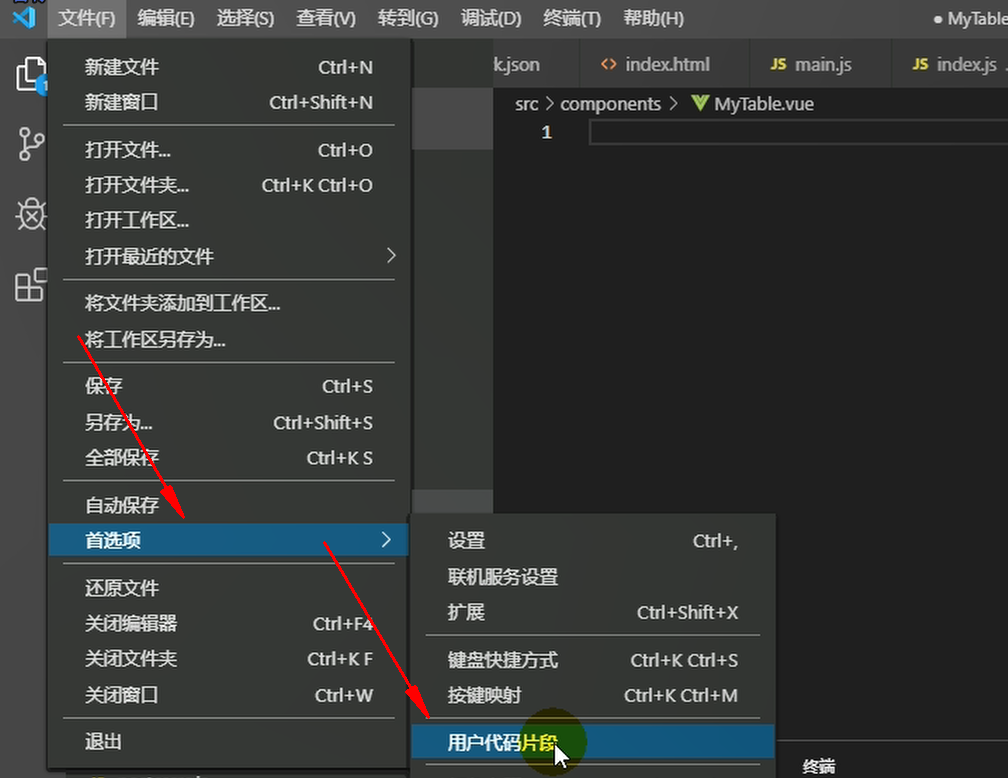
新建一个全局的代码片段,名字为vue,然后回车:
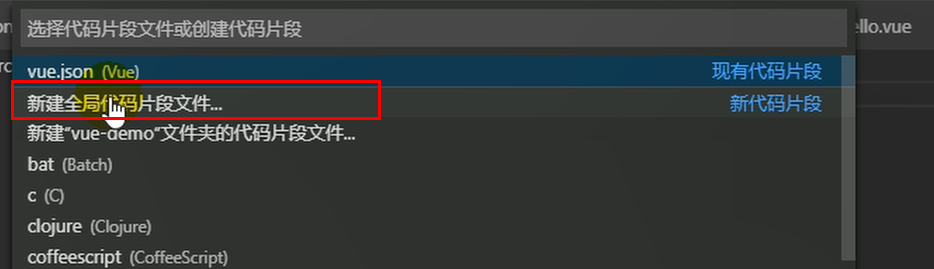
将下面的代码片段粘贴到“vue.code-snippets”
{
    // Place your 全局 snippets here. Each snippet is defined under a snippet name and has a scope, prefix, body and
    // description. Add comma separated ids of the languages where the snippet is applicable in the scope field. If scope
    // is left empty or omitted, the snippet gets applied to all languages. The prefix is what is
    // used to trigger the snippet and the body will be expanded and inserted. Possible variables are:
    // $1, $2 for tab stops, $0 for the final cursor position, and ${1:label}, ${2:another} for placeholders.
    // Placeholders with the same ids are connected.
    // Example:
    // "Print to console": {
    // 	"scope": "javascript,typescript",
    // 	"prefix": "log",
    // 	"body": [
    // 		"console.log('$1');",
    // 		"$2"
    // 	],
    // 	"description": "Log output to console"
    // }
    "生成vue模板": {
        "prefix": "vue",
        "body": [
            "<!-- $1 -->",
            "<template>",
            "<div class='$2'>$5</div>",
            "</template>",
            "",
            "<script>",
            "//这里可以导入其他文件(比如:组件,工具js,第三方插件js,json文件,图片文件等等)",
            "//例如:import 《组件名称》 from '《组件路径》';",
            "",
            "export default {",
            "//import引入的组件需要注入到对象中才能使用",
            "components: {},",
            "data() {",
            "//这里存放数据",
            "return {",
            "",
            "};",
            "},",
            "//监听属性 类似于data概念",
            "computed: {},",
            "//监控data中的数据变化",
            "watch: {},",
            "//方法集合",
            "methods: {",
            "",
            "},",
            "//生命周期 - 创建完成(可以访问当前this实例)",
            "created() {",
            "",
            "},",
            "//生命周期 - 挂载完成(可以访问DOM元素)",
            "mounted() {",
            "",
            "},",
            "beforeCreate() {}, //生命周期 - 创建之前",
            "beforeMount() {}, //生命周期 - 挂载之前",
            "beforeUpdate() {}, //生命周期 - 更新之前",
            "updated() {}, //生命周期 - 更新之后",
            "beforeDestroy() {}, //生命周期 - 销毁之前",
            "destroyed() {}, //生命周期 - 销毁完成",
            "activated() {}, //如果页面有keep-alive缓存功能,这个函数会触发",
            "}",
            "</script>",
            "<style lang='scss' scoped>",
            "//@import url($3); 引入公共css类",
            "$4",
            "</style>"
        ],
        "description": "生成VUE模板"
    },
    "http-get请求": {
        "prefix": "httpget",
        "body": [
            "this.\\$http({",
            "url: this.\\$http.adornUrl(''),",
            "method: 'get',",
            "params: this.\\$http.adornParams({})",
            "}).then(({ data }) => {",
            "})"
        ],
        "description": "httpGET请求"
    },
    "http-post请求": {
        "prefix": "httppost",
        "body": [
            "this.\\$http({",
            "url: this.\\$http.adornUrl(''),",
            "method: 'post',",
            "data: this.\\$http.adornData(data, false)",
            "}).then(({ data }) => { });"
        ],
        "description": "httpPOST请求"
    }
}
2
3
4
5
6
7
8
9
10
11
12
13
14
15
16
17
18
19
20
21
22
23
24
25
26
27
28
29
30
31
32
33
34
35
36
37
38
39
40
41
42
43
44
45
46
47
48
49
50
51
52
53
54
55
56
57
58
59
60
61
62
63
64
65
66
67
68
69
70
71
72
73
74
75
76
77
78
79
80
81
82
83
84
85
86
87
88
89
90
91
92
93
94
更多详细说明见: https://blog.csdn.net/z772330927/article/details/105730430/
# 5. vscode快捷键
ctrl+shift+f 全局搜索
alt+shift+f 格式化代码
# 6. 关闭eslint的语法检查
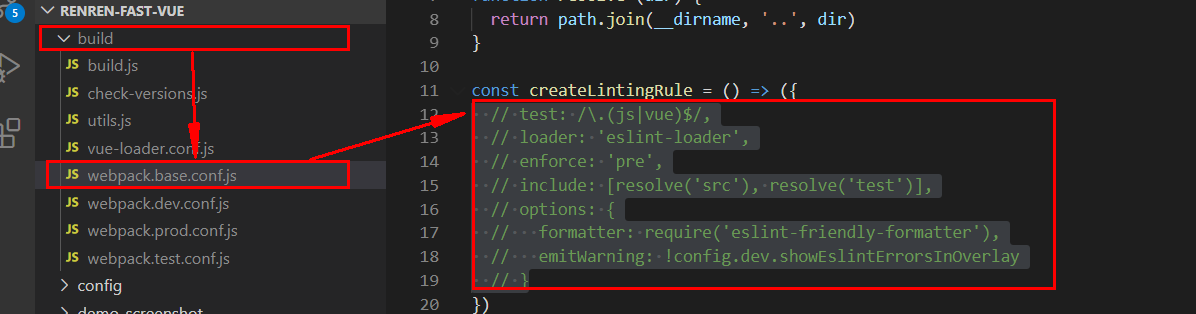
# 7. 安装mybatisx插件
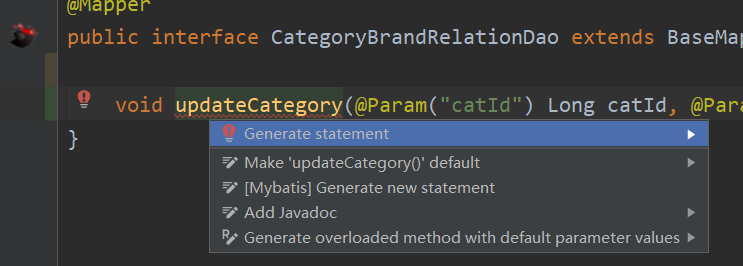
在Marketplace中搜索“mybatisx”,安装后重启IDEA,使用时会自动在@Mapper标注的接口上,产生小图标,然后alt+enter,generate statement,就会自动的在xml文件中生成SQL。
# 8. mysql的批量删除
DELETE FROM `pms_attr_attrgroup_relation` WHERE (attr_id= ? AND attr_group_id ) OR (attr_id= ? AND attr_group_id )
# 9. String.join
java.lang.String @NotNull
public static String join(@NotNull CharSequence delimiter,
                          @NotNull Iterable<? extends CharSequence> elements)
2
3
Returns a new String composed of copies of the CharSequence elements joined together with a copy of the specified delimiter.
返回一个由CharSequence元素的副本和指定分隔符的副本组成的新字符串。
For example,
 List<String> strings = new LinkedList<>();
 strings.add("Java");strings.add("is");
 strings.add("cool");
 String message = String.join(" ", strings);
 //message returned is: "Java is cool"

 Set<String> strings = new LinkedHashSet<>();
 strings.add("Java"); strings.add("is");
 strings.add("very"); strings.add("cool");
 String message = String.join("-", strings);
 //message returned is: "Java-is-very-cool"
Note that if an individual element is null, then "null" is added.
注意,如果单个元素为null,则添加“null”。
Params: delimiter – a sequence of characters that is used to separate each of the elements in the resulting String 用于分隔结果字符串中的每个元素的字符序列
elements – an Iterable that will have its elements joined together. 将其元素连接在一起的可迭代的。
Returns: a new String that is composed from the elements argument 由elements参数组成的新字符串
Throws: NullPointerException – If delimiter or elements is null
    public static String join(CharSequence delimiter,
            Iterable<? extends CharSequence> elements) {
        Objects.requireNonNull(delimiter);
        Objects.requireNonNull(elements);
        StringJoiner joiner = new StringJoiner(delimiter);
        for (CharSequence cs: elements) {
            joiner.add(cs);
        }
        return joiner.toString();
    }
2
3
4
5
6
7
8
9
10
能够看到实际上它就是通过创建StringJoiner,然后遍历elements,加入每个元素来完成的。
StringJoiner
java.util public final class StringJoiner
extends Object
2
StringJoiner is used to construct a sequence of characters separated by a delimiter and optionally starting with a supplied prefix and ending with a supplied suffix. tringJoiner用于构造由分隔符分隔的字符序列,可以选择以提供的前缀开始,以提供的后缀结束。
Prior to adding something to the StringJoiner, its sj.toString() method will, by default, return prefix + suffix. However, if the setEmptyValue method is called, the emptyValue supplied will be returned instead. This can be used, for example, when creating a string using set notation to indicate an empty set, i.e. "{}", where the prefix is "{", the suffix is "}" and nothing has been added to the StringJoiner. 在向StringJoiner添加内容之前,它的sj.toString()方法在默认情况下会返回前缀+后缀。但是,如果调用setEmptyValue方法,则返回所提供的emptyValue。例如,当使用set符号创建一个字符串来表示一个空集时,可以使用这种方法。“{}”,其中前缀是“{”,后缀是“}”,没有向StringJoiner添加任何内容。
apiNote: The String "[George:Sally:Fred]" may be constructed as follows:
 StringJoiner sj = new StringJoiner(":", "[", "]");
 sj.add("George").add("Sally").add("Fred");
 String desiredString = sj.toString();
2
3
A StringJoiner may be employed to create formatted output from a java.util.stream.Stream using java.util.stream.Collectors.joining(CharSequence). For example: 使用StringJoiner从java.util.stream创建格式化输出流,使用java.util.stream.Collectors.joining (CharSequence进行)。例如:
 List<Integer> numbers = Arrays.asList(1, 2, 3, 4);
 String commaSeparatedNumbers = numbers.stream()
     .map(i -> i.toString())
     .collect(Collectors.joining(", "));
2
3
4
通过分析源码发现,在“”内部维护了一个StringBuilder,所有加入到它内部的元素都会先拼接上分割符,然后再拼接上加入的元素
 public StringJoiner add(CharSequence newElement) {
        prepareBuilder().append(newElement);
        return this;
 }
2
3
4
   private StringBuilder prepareBuilder() {
        if (value != null) {
            value.append(delimiter);
        } else {
            value = new StringBuilder().append(prefix);
        }
        return value;
    }
2
3
4
5
6
7
8
# 10. 在Service中微服务比较多的时候,可以配置将一些微服务放置到compound中,组成一个小组
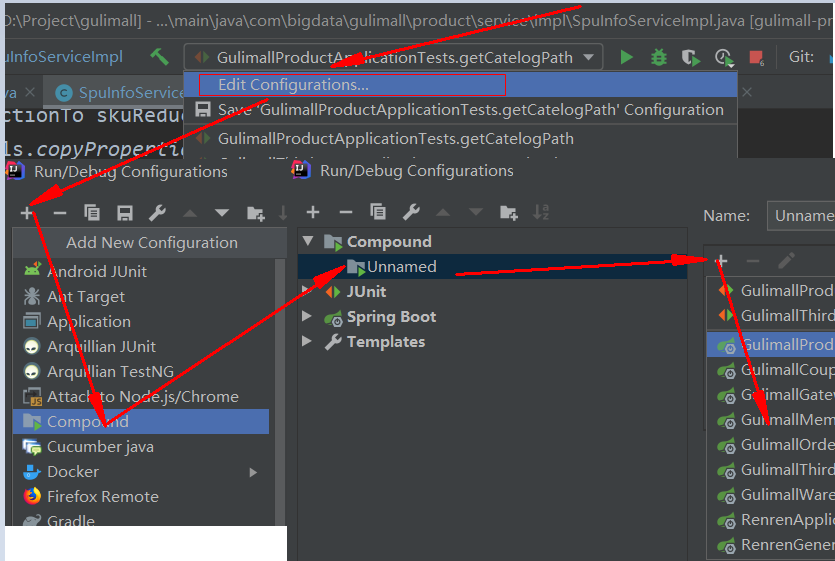
以后再运行时,直接选择这个compound即可很方便的运行或停止一组微服务:
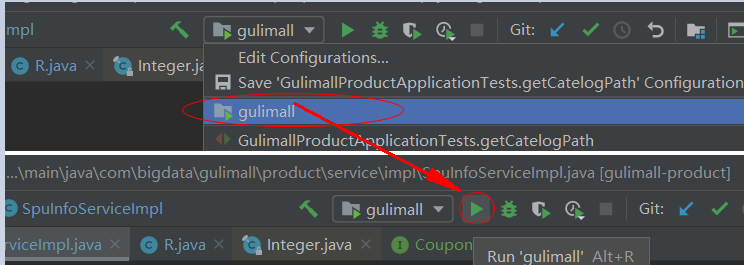
另外可以单独为每个微服务,设置需要的运行时最大堆内存大小:
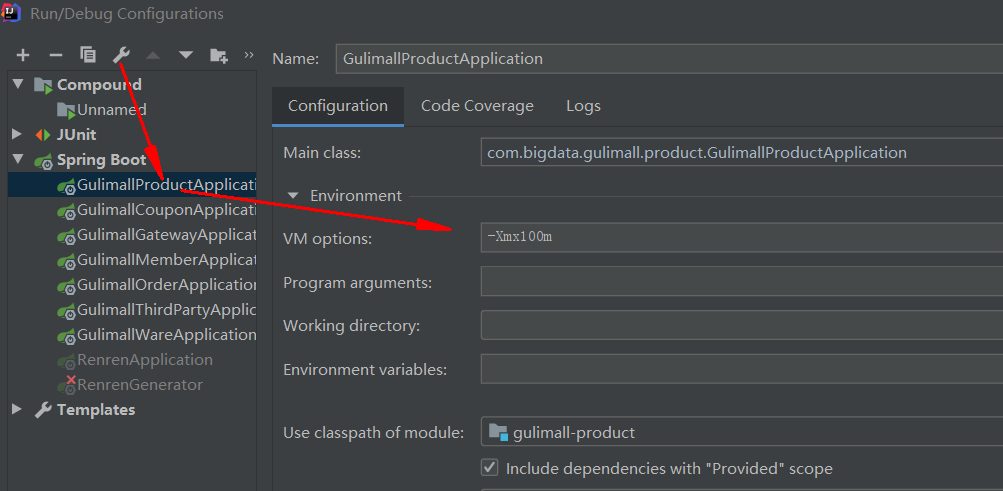
# 11. mysql的dateTime和timestamp的区别?
MySQL中datetime和timestamp的区别及使用 (opens new window)
TIMESTAMP和DATETIME的相同点:
1> 两者都可用来表示YYYY-MM-DD HH:MM:SS[.fraction]类型的日期。
TIMESTAMP和DATETIME的不同点:
1> 两者的存储方式不一样
对于TIMESTAMP,它把客户端插入的时间从当前时区转化为UTC(世界标准时间)进行存储。查询时,将其又转化为客户端当前时区进行返回。
而对于DATETIME,不做任何改变,基本上是原样输入和输出。
2> 两者所能存储的时间范围不一样
timestamp所能存储的时间范围为:'1970-01-01 00:00:01.000000' 到 '2038-01-19 03:14:07.999999'。
datetime所能存储的时间范围为:'1000-01-01 00:00:00.000000' 到 '9999-12-31 23:59:59.999999'。
总结:TIMESTAMP和DATETIME除了存储范围和存储方式不一样,没有太大区别。当然,对于跨时区的业务,TIMESTAMP更为合适。
https://www.cnblogs.com/Jashinck/p/10472398.html
# 12. SpringBoot中的事务
https://blog.csdn.net/Z__Sheng/article/details/89489053
# 13. IDEA RESTFUll clinet
IntelliJ IDEA 使用 rest client (opens new window)